Make your website with AI
AI can write a website’s code, but the site still needs an address, a server, a secure connection and maintenance. In Nettipoika Studio they come in one service: you say what you want and decide what gets published.
Make a site for my business: describe our services, show our prices and add a contact form.
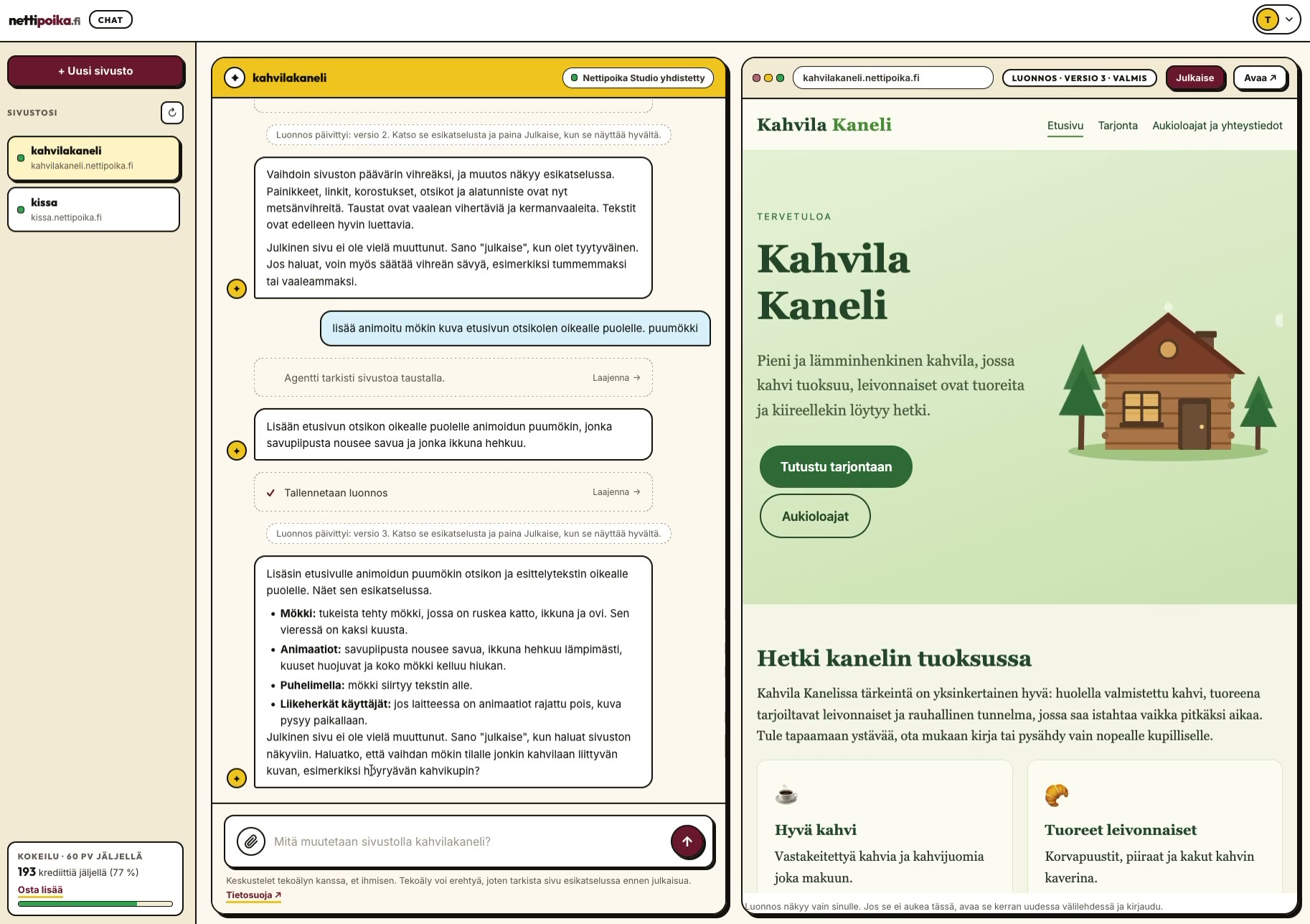
What the AI does and what you decide
The AI interprets your instructions, writes the site’s text and code and makes the changes you ask for. You give it the right details: services, prices, opening hours and contact details. The AI can get things wrong, so changes go to a draft first, which you see in a private preview.
The decisions stay with you. You create the account, accept the terms and the payment, decide the AI’s permissions and choose when to publish. Wider permissions and database changes that delete data always need your approval.
Why code alone is not enough
An AI chat quickly gives you a page’s code, but that is not yet online. A site needs a server that keeps it up around the clock, an address customers can find, and a secure HTTPS connection. Someone also has to look after updates, reliability and a way back to an earlier version.
In Nettipoika Studio every site gets a free yourname.nettipoika.dev address, and you can add your own domain. Sites run on servers in Europe, isolated from each other, and the service is built and maintained in Finland.
Studio’s chat or your own AI
You can build your site in Nettipoika Studio’s own chat. The chat shows in plain language what it is doing, and your credit balance is visible in Studio all the time. A small text change uses fewer credits than a whole new page.
If you already use an AI assistant that can add a remote MCP server with OAuth sign-in, you can connect it to Studio. You approve the connection and its permissions yourself in the browser and can revoke them in the dashboard. Then you use no credits.
More than a brochure site
Your site can take bookings, collect registrations or run a small tool of your own, with data stored in the PostgreSQL database that comes with your plan. If the site needs a payment or email service key, you enter it yourself in the dashboard; it is encrypted at once, and the AI never sees it.
A good first message
The AI does its best work when it knows who the site is for. In your first message, say briefly what your business does, who your customers are and what a visitor should do on the site: call, book, sign up or send a message. Include the text you already have, such as your price list and contact details.
For the look, a few words are enough, for example fresh and reliable or warm and relaxed, plus the colours you already use in your logo or shop. You don’t have to get everything right at once: the first version is a draft you refine in the preview.
When you ask for a change
A change request works best when it is concrete: say which part you mean and how it should look. One thing at a time is often faster than a long list. If you don’t like the result, say what doesn’t work and the AI tries again, or go back to an earlier version.
Don’t write passwords or service keys in a message. If the site needs a key, you enter it in the dashboard, where it is encrypted at once. The AI doesn’t need to see it for the site to work.
Who this suits
Nettipoika Studio is made for small businesses, associations and anyone who wants a site online without coding and without learning a publishing system. It suits presentation sites and small services such as booking or sign-up. For bigger apps, technical skills help.
Example messages for everyday changes
How to get started
- Start the trial with an email address and a payment card.
- Choose your site’s address.
- Tell the AI what kind of site you want and what it should show.
- Check the site in the preview and change it in your own words until you are happy.
- Publish at the address you chose.
Questions and answers
Do I need to know how to code?
No. You say in plain language what you want. Your job is to give the right details and check the result.
What happens if my credits run out?
Your site stays online even if your credits run out. The monthly allowance renews, and you can buy more credits in packs with a payment you approve.
Whose site is it?
Yours. You can export the site’s source code and data from the dashboard, and site data is kept for 30 days after suspension.
What happens after the trial?
Your subscription continues at the price you chose, and you see the first billing date before you approve. You can stop the renewal in the dashboard before the trial ends.
Price and trial
Nettipoika Studio costs €18.83 a month or €125.50 a year, including Finnish VAT at 25.5 %. It includes keeping your site online, a free yourname.nettipoika.dev address with a secure connection, and support. You also get 500 credits every month for building; a simple site takes about 50 credits. The trial is free for 60 days, and all you need is an email address and a payment card. Your own domain, such as company.fi, is paid separately to its provider.
No time to do it yourself? We build the site for you from €299 + VAT. See our services
Try it free for 60 days
All you need is an email address and a payment card. We remind you before the first charge, and you can stop the renewal in the dashboard before the trial ends.