Online booking on your website
There are two ways to put booking on your website: a link to a ready-made booking service, or a booking form of your own on the site. Both have their merits. This page goes through what each means for reminders, payments, cancellations and personal data.
Make a website for my salon where people can book an appointment. Add Saturday slots from 10 to 2.
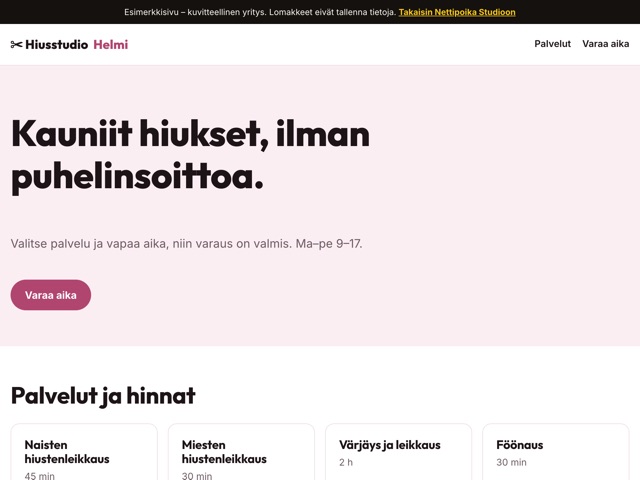
Way 1: a link to a ready-made booking service
If you already use a booking service, its calendar, reminders and payments stay as they are. The site gets a clear button that takes visitors to book, repeated at the bottom of the page and next to each service.
A ready-made service is often easiest when you need text message reminders, online payment at booking or calendars for several staff. The booking data then lives in the provider’s system, under its own terms and prices.
Way 2: booking of your own on the site
Your site can also have booking of its own. You tell the AI which services can be booked, how long they take and when you work, and customers pick a free slot straight from your site. Bookings are stored in the PostgreSQL database that comes with your plan, and you can ask for a page where you see upcoming bookings.
If a booking confirmation goes out by email or bookings are paid in advance, the site needs an email or payment service key. You enter it yourself in the dashboard; it is encrypted at once, and the AI never sees it. Cancellations are your call: say on the site whether people cancel by phone, email or a form, and how far ahead.
Booking of your own suits a simple need: a few services, one person and your own working hours.
Personal data
A booking form collects your customers’ personal data, and with your own booking you are responsible for it. Ask only for a name and a way to reach them, say on the site what the data is used for, and delete old bookings when they are no longer needed.
Test before you go live
- Make a test booking for every service in the preview.
- Check that the same slot cannot be booked twice and that times outside your hours cannot be booked.
- If a confirmation goes out by email, book a slot with your own address and check that the message arrives.
- Try booking on a phone, since that is how most customers will book.
Which suits you
- A ready-made service: when you need text message reminders, payment at booking or calendars for several people.
- A ready-made service: when your customers already book through it and there is no reason to change.
- Your own booking: when you want bookings on your own site without a separate service and your needs are simple.
- Your own booking: when you want to decide yourself what the form asks and how booking looks.
What the booking form asks
A good booking form is short: the service, the time, a name and a phone number or email. Add another question only if you need the answer before the visit, for example hair length or whether the customer has been before. Every extra field is a reason to give up on booking.
The first weeks with new booking
When you start taking bookings on your site, tell your regulars and keep phone booking alongside for a while. Look at new bookings every day, and if a question causes confusion, change the form’s wording with a message.
Mark holidays and exceptional days in your booking well ahead so nobody books them. If you use a ready-made service, mark them there and only say on your site when you are away.
When you change how people book
If you move from a ready-made service to your own booking or the other way round, switch on a quiet day and make sure existing bookings are safe before the old way is retired.
Example messages for everyday changes
How to get started
- First decide whether you use a ready-made service or a form of your own.
- Start the trial and choose your site’s address.
- In your first message, give your services, durations and working hours, or your booking service’s address.
- Test bookings in the preview using the list above.
- Publish and tell your customers about the new way to book.
Questions and answers
Can I switch from a ready-made service to my own booking later?
Yes. Describe the change in a message, check the new booking in the preview and publish when it works. You can go back to an earlier version from the version history.
Is the database included in the price?
Yes. Bookings are stored in a PostgreSQL database that is part of your plan.
Does the AI see my payment or email service key?
No. You enter the key yourself in the dashboard, and it is encrypted at once.
What if booking doesn’t work?
Tell support by email or ask the AI to report the problem to us. We answer in Finnish, usually the next working day.
Price and trial
Nettipoika Studio costs €18.83 a month or €125.50 a year, including Finnish VAT at 25.5 %. It includes keeping your site online, a free yourname.nettipoika.dev address with a secure connection, and support. You also get 500 credits every month for building; a simple site takes about 50 credits. The trial is free for 60 days, and all you need is an email address and a payment card. Your own domain, such as company.fi, is paid separately to its provider.
No time to do it yourself? We build the site for you from €299 + VAT. See our services
Try it free for 60 days
All you need is an email address and a payment card. We remind you before the first charge, and you can stop the renewal in the dashboard before the trial ends.