Websites for restaurants and cafés
People look for a restaurant’s menu, opening hours and table booking. They change often, so updating must be easy. In Nettipoika Studio a new lunch menu is one message.
Update this week’s lunch menu: salmon soup on Monday, chicken and rice on Tuesday.
The menu as text, not an image
Many restaurants publish their menu as a photo or a PDF. That is hard to read on a phone, and search engines don’t understand it. Write the dishes and prices as text and mark diets such as gluten-free, lactose-free and vegan the same way on every dish.
Keep the à la carte menu, lunch and drinks in sections of their own. If your menu changes with the season, you can ask for a whole new menu in one message.
Lunch menu and holiday hours by message
On a lunch restaurant’s site the most important information changes every week. You write the week’s lunches as a message, check the change in the preview and publish. An urgent fix, such as an unexpected closure, can be published straight away.
Write your opening hours the same way on the front page and with your contact details. When holiday hours change, give the exceptions with dates and they show in both places.
Table booking
There are three ways to take table bookings: a phone number visitors can tap on their phone, a link to the booking service you already use, or a booking form on your site. Your own form stores bookings in the database that comes with your plan; in that case, tell the AI how many tables you have and your opening hours.
You add your own photos and PDF files through a secure upload link. Photos are resized for the web automatically, and location and camera data are removed before publishing.
Groups, parties and orders
If you take groups, host private events or make cakes and catering, give them a section of their own. Say how many people the space holds, how far ahead orders must be made and how to arrange them. A contact form that asks for the date, number of guests and wishes saves many phone calls. If you have set party menus, list them with prices in the same section.
Contact details, directions and access
People often look for a restaurant on the way there. Put the address, phone number and today’s opening hours at the top of the front page. Mention parking, the nearest stop and whether there is step-free access for wheelchairs and prams.
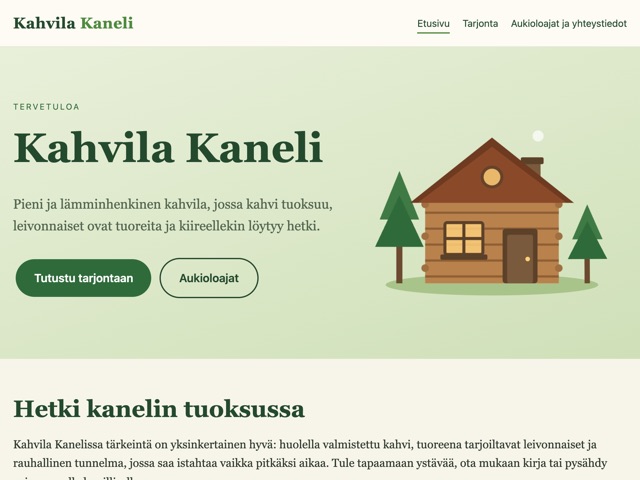
On a café’s site, a short description of the atmosphere and a few photos of your baking work well. Kahvila Kaneli is an example of a café’s presentation site built in Nettipoika Studio.
How to lay out the lunch menu
A good lunch menu first says on which days and at what times lunch is served and what it costs. Then come the days on their own lines, each with its dishes and diet labels. When the layout stays the same from week to week, regulars find what they need quickly, and the weekly update is a short message.
If you hold theme nights, gigs or seasonal menus, put them on the front page with their dates. Old events are removed the same way with a message, so the site never looks abandoned.
When the kitchen is busy
In a restaurant, few people have time to sit at a computer. So an update has to work with a short message whenever you have a moment: in the morning before opening or in the evening after closing. The change waits in a draft until you check it and publish, so a half-finished menu never reaches your customers.
If the same person runs the kitchen and the site, agree on one fixed time each week for updating the lunch menu. You can also write the whole week’s menu at once on Monday morning and fix a single day if an ingredient runs out.
Example messages for everyday changes
How to get started
- Start the trial and choose an address from your restaurant’s name.
- Paste your menu as text into your first message, with your opening hours and address.
- Add photos of the restaurant and a few dishes.
- Check the prices and diet labels in the preview.
- Publish, and from then on update the lunch menu with a message every week.
Questions and answers
Who can update the lunch menu?
Updates are made from the account the site belongs to. Whoever updates it needs no coding: they write the change as a message and check it in the preview before publishing.
Can one plan have sites for two restaurants?
Yes. One plan has room for several small websites within its shared capacity, and you are not billed per site.
Does the site stay online if I don’t update it?
Yes. The subscription keeps the site online, and maintenance and visitors use no credits.
Do I get receipts for my bookkeeping?
Yes. VAT receipts are in the dashboard.
Price and trial
Nettipoika Studio costs €18.83 a month or €125.50 a year, including Finnish VAT at 25.5 %. It includes keeping your site online, a free yourname.nettipoika.dev address with a secure connection, and support. You also get 500 credits every month for building; a simple site takes about 50 credits. The trial is free for 60 days, and all you need is an email address and a payment card. Your own domain, such as company.fi, is paid separately to its provider.
No time to do it yourself? We build the site for you from €299 + VAT. See our services
Try it free for 60 days
All you need is an email address and a payment card. We remind you before the first charge, and you can stop the renewal in the dashboard before the trial ends.