Websites for hair salons and barbers
Customers usually look for a salon on their phone and want to see three things quickly: what you do, what it costs and how to book. In Nettipoika Studio you tell the AI these things in your own words, and it builds a site you edit the same way.
Make a site for my barber shop: services and prices, opening hours, contact details and a button for booking an appointment.
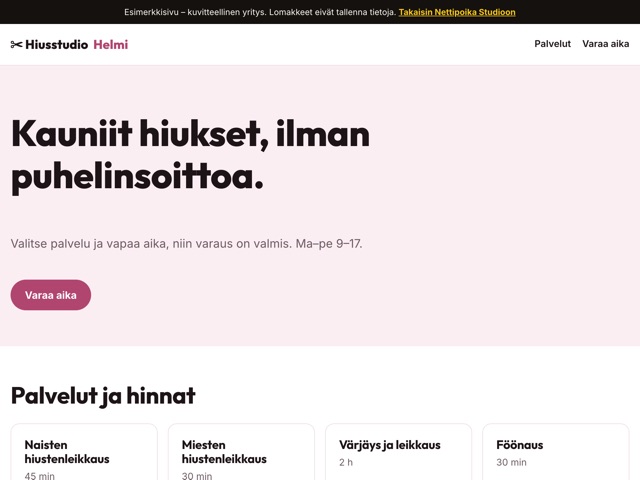
Which pages a salon needs
A small salon often needs just one clear page with a few sections. The top of the front page shows the salon’s name, town and a booking button, so customers don’t have to look for it. Below it come services and prices, then your stylists, opening hours and contact details.
In the price list, say what the price depends on: cuts for short and long hair, colour, highlights and styling on their own lines, and a from-price where you use one. When prices are text rather than an image, they read well on a phone.
Your stylists and your work
People often choose a salon for one stylist. A short introduction to each of them, their speciality and the days they take bookings helps a new customer choose. Photos of finished hair tell more about your style than a long text.
You add your own photos and PDF files through a secure upload link. Photos are resized for the web automatically, and location and camera data are removed before publishing.
Booking on a salon website
If your salon already has a booking system, the site only needs a clear Book now button that leads to it. Customers book as before, and your calendar stays the same.
If you are starting from scratch, the site can have booking of its own: customers pick a service and a free slot, and bookings are stored in a PostgreSQL database that comes with your plan. The Hiusstudio Helmi demo shows what that can look like.
How customers find your salon
People usually search for a salon by town or neighbourhood. Say clearly on the site where you are, and describe your services in the words your customers use: haircut, barber, colour, perm or wedding hair. No search engine promises anyone a ranking, but clear text helps it understand what your site offers.
Add directions too: the nearest stop, parking and whether the salon is at street level. Small details like these save phone calls and help a new customer find you the first time.
Check before publishing
- Every service has a price or a from-price.
- The booking button shows on a phone without scrolling.
- The phone number can be tapped and calls the right number.
- The opening hours match on the front page and with your contact details.
On a barber’s site
People often walk into a barber’s without booking. If you take walk-ins, say so on the front page and mention when the queue is usually shortest. If you also shape beards, do tidy-ups or cut children’s hair, list them as services of their own with prices, so customers don’t have to call to ask.
If you sell hair care products or gift cards, a short mention is enough: what is available and whether a gift card can be bought in the shop or by phone. For a small business this is often better than a separate online shop.
When prices or staff change
A salon’s site usually goes out of date in the price list and the list of stylists. When prices rise or a new stylist starts, write the change as a message the same day, so no customer gets a surprise at the till.
Example messages for everyday changes
How to get started
- Start the trial with an email address and a payment card, and choose your site’s address.
- Write your first message: the salon’s name, services and prices, opening hours and how to book.
- Add photos of the salon and your work through the upload link.
- Look at the preview on your phone and ask for changes in your own words.
- Publish when the price list and contact details are right.
Questions and answers
Can I use my salon’s own domain?
Yes. Every site gets a free yourname.nettipoika.dev address, and you can add your own domain such as salon.fi. The dashboard tells you which details to add to the domain’s settings. The domain is paid separately to its provider.
Can I keep my current booking system?
Yes. The site gets a button that leads to your current booking service, and customers have nothing new to learn.
What happens when the trial ends?
Your subscription continues at the monthly or annual price you chose, and you see the first billing date before you approve. If you don’t want to continue, stop the renewal in the dashboard before the trial ends.
What if I have no time to do it myself?
We can also build the site for you. The price and details are on the Nettipoika services page, linked in the price section of this page.
Price and trial
Nettipoika Studio costs €18.83 a month or €125.50 a year, including Finnish VAT at 25.5 %. It includes keeping your site online, a free yourname.nettipoika.dev address with a secure connection, and support. You also get 500 credits every month for building; a simple site takes about 50 credits. The trial is free for 60 days, and all you need is an email address and a payment card. Your own domain, such as company.fi, is paid separately to its provider.
No time to do it yourself? We build the site for you from €299 + VAT. See our services
Try it free for 60 days
All you need is an email address and a payment card. We remind you before the first charge, and you can stop the renewal in the dashboard before the trial ends.